Skip Navigation Links.
Collapse DriveHQ online hulpDriveHQ online hulp
Welkom bij DriveHQ Cloud IT Service
Aan de slag met DriveHQ
Expand <span style='cursor:hand' id='spnode_value101' onclick="SetNode('spnode_value101');">   De DriveHQ-website gebruiken</span> De DriveHQ-website gebruiken
Expand <span style='cursor:hand' id='spnode_value14600' onclick="SetNode('spnode_value14600');">   Groepsaccountbeheer</span> Groepsaccountbeheer
Expand <span style='cursor:hand' id='spnode_value14700' onclick="SetNode('spnode_value14700');">   Cloud Drive-mapping</span> Cloud Drive-mapping
Collapse <span style='cursor:hand' id='spnode_value15000' onclick="SetNode('spnode_value15000');">   DriveHQ-clientsoftware gebruiken</span> DriveHQ-clientsoftware gebruiken
Expand <span style='cursor:hand' id='spnode_value76' onclick="SetNode('spnode_value76');">   FTP-hostingservice</span> FTP-hostingservice
Expand <span style='cursor:hand' id='spnode_value19900' onclick="SetNode('spnode_value19900');">   E-mailhostingservice</span> E-mailhostingservice
Expand <span style='cursor:hand' id='spnode_value65' onclick="SetNode('spnode_value65');">   Webhostingdienst</span> Webhostingdienst
Expand <span style='cursor:hand' id='spnode_206' onclick="SetNode('spnode_206');">   Bestandsdropbox</span> Bestandsdropbox
Expand <span style='cursor:hand' id='spnode_value87' onclick="SetNode('spnode_value87');">   Partnerschapsprogramma’s</span> Partnerschapsprogramma’s
Expand <span style='cursor:hand' id='spnode_value210' onclick="SetNode('spnode_value210');">   Mobiele toegang</span> Mobiele toegang
Expand <span style='cursor:hand' id='spnode_value21000' onclick="SetNode('spnode_value21000');">   Geavanceerde functies en services</span> Geavanceerde functies en services


DriveHQ Team Anywhere: Remote Desktop, Remote Access, Remote Assistance
DriveHQ's CameraFTP Cloud Recording Service


Instructievideo's
Servicehandleiding
Ondersteuningsforum
Klantenservice

Maak een gratis account aan bij DriveHQ Online Backup


Je kunt je online aanmelden via www.DriveHQ.com; Als je dat nog niet hebt gedaan, kun je je ook aanmelden via een van de DriveHQ-desktopsoftware, bijvoorbeeld DriveHQ Online Backup.
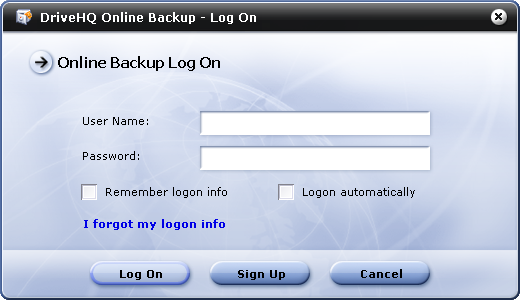
In de Login dialoogvenster, klik op Aanmelden knop. Er verschijnt dan het volgende dialoogvenster.
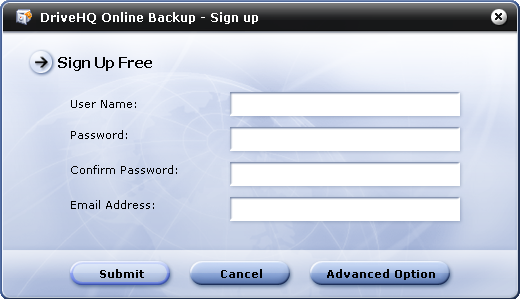
Vul alle vereiste gegevens in en klik op Indienen. U moet een geldig e-mailadres invoeren en de activeringsmail ontvangen om uw account te activeren.

Als u meer informatie wilt invoeren, kunt u klikken op Geavanceerde optie. Er wordt een meer gedetailleerde aanmeldpagina in uw webbrowser geopend.