I would like to allow FileManager to access the Documents directory on my Mac (Catalina). I think what happened is the first time I tried to access that directory in FileManager, the MacOS asked whether I wanted to allow FileManager permission to access that directxory and I reflexively said no. Oops. Unfortunately now I can't find any way to reverse that mistake. How do I change that at this point?
You can change it as follows:
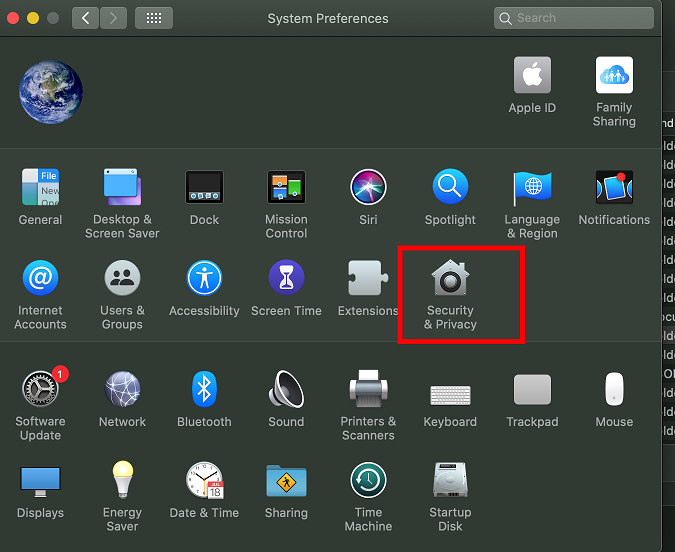
1: Open "System Preferences" and select "Security & Privacy".
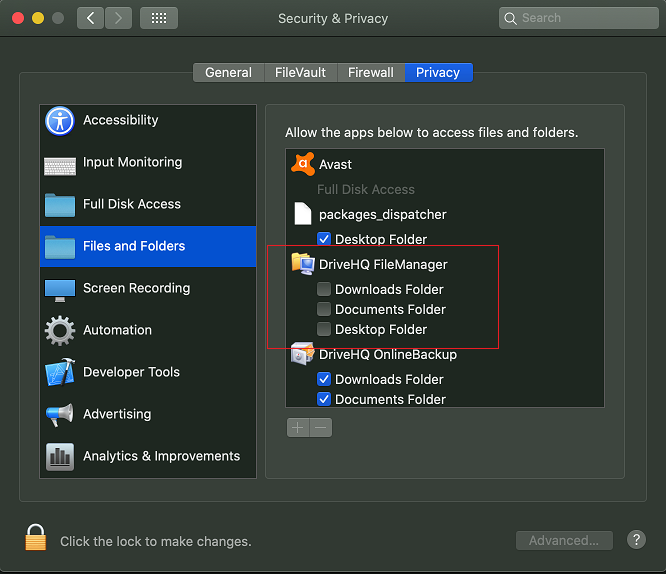
2: In Secutity & Privacy dialog, select "Privacy" tab and select "Files and Folders". Check the checkboxes to allow access.
Vui lòng Đăng nhập để trả lời. Bạn chưa phải là thành viên của DriveHQ?