\ DriveHQ Customer Support Forum \
읽음/답글 : 25235/1
  • Ahmad Hamadeh
  • (1게시물)

 I have a daily backup.  Apparently we got hit with one of thosse crypto viruses.  The latest backup was just a backup of the encrypted files so is useless.  How do I browse the previous backups to see if the previous day was infected before I go and restore 60G of files only to find they are encrypted as well?


2017-11-19 오전 10:04:30

  • DriveHQSupport_
  • (672게시물)
주제: Re:How to Browse older backups before restore?

From your DriveHQ Online Backup software, click the Restore tab, then select a backup task on the left-hand side. Click "Restore to new location". If you know when you were hit with the encryption virus, then you can select "Restore the version before", and enter a time before the virus attack.

Please see the screenshot below:
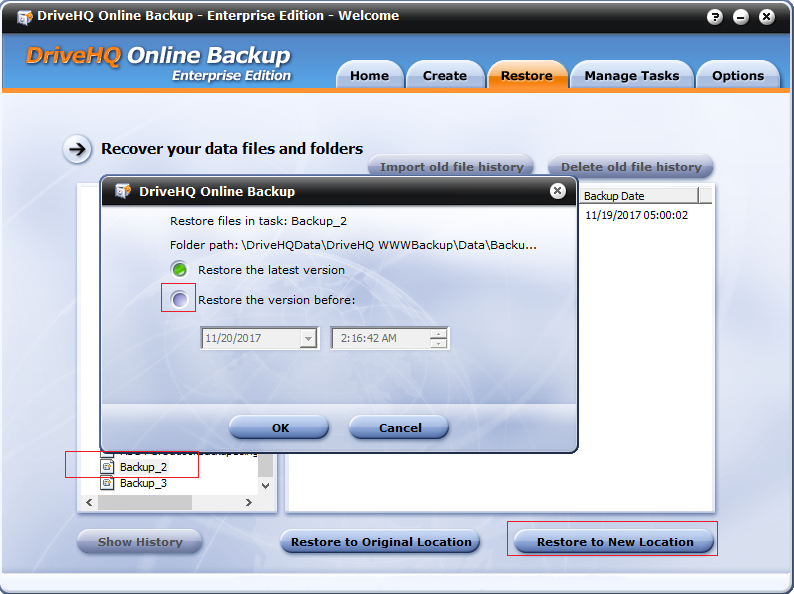
 

Alternatively, you can navigate to a subfolder, and then right click on it and select "Restore to New Location".


회신하다
2017-11-20 오전 2:30:51

즐겨찾기에 추가하고 공유하세요
빠른 답변

제발 로그인 그리고 답장하세요. DriveHQ 회원이 아니신가요?


Leading Cloud Surveillance service

Leading Enterprise Cloud IT Service Since 2003