\ DriveHQ Customer Support Forum \
已读/回复 : 24324/1
  • Ahmad Hamadeh
  • (1帖子)

 I have a daily backup.  Apparently we got hit with one of thosse crypto viruses.  The latest backup was just a backup of the encrypted files so is useless.  How do I browse the previous backups to see if the previous day was infected before I go and restore 60G of files only to find they are encrypted as well?


2017/11/19 10:04:30

  • DriveHQSupport_
  • (672帖子)
主题: Re:How to Browse older backups before restore?

From your DriveHQ Online Backup software, click the Restore tab, then select a backup task on the left-hand side. Click "Restore to new location". If you know when you were hit with the encryption virus, then you can select "Restore the version before", and enter a time before the virus attack.

Please see the screenshot below:
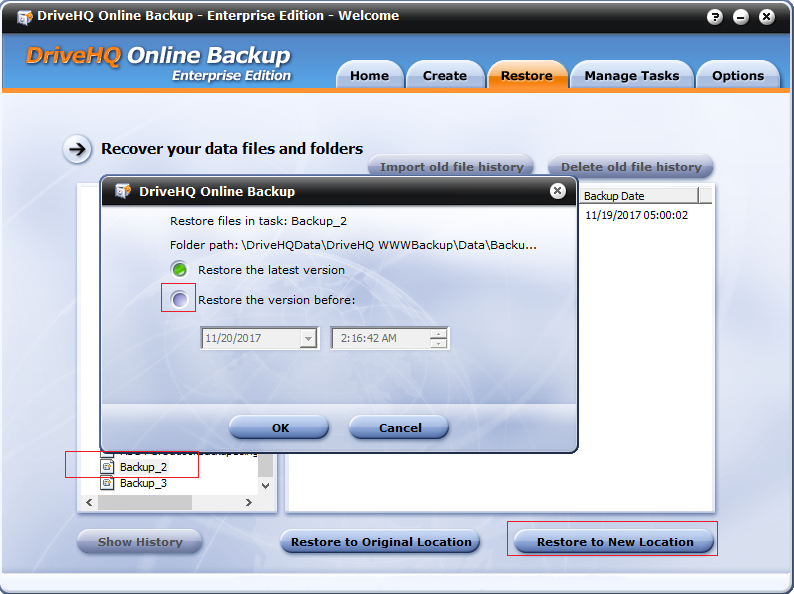
 

Alternatively, you can navigate to a subfolder, and then right click on it and select "Restore to New Location".


回复
2017/11/20 2:30:51

收藏并分享
快速回复

请 登录 回复如下: 还不是DriveHQ会员?


Leading Cloud Surveillance service

Leading Enterprise Cloud IT Service Since 2003